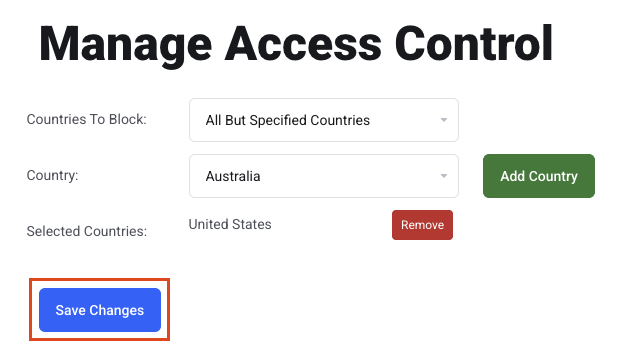
Access Control
Allow email logins from countries outside the US, for remote workers or travel.
EnGuard only allows email logins from the United States. This protects your email accounts from hackers around the world. Whenever you log in, we check your IP address to see where you are before allowing access.
- If you have remote workers in other countries, you can allow permanent access from those countries.
- When employees travel outside the US, you can allow temporary access from those countries.
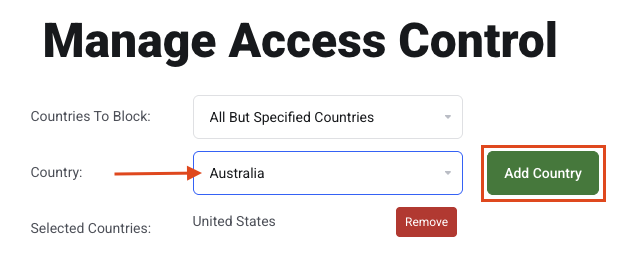
In this example, we allow access from Australia.
Step 0: Open your email management page
See this short guide to get to the page where you manage a domain's email service: How to Get to Your Email Management Page
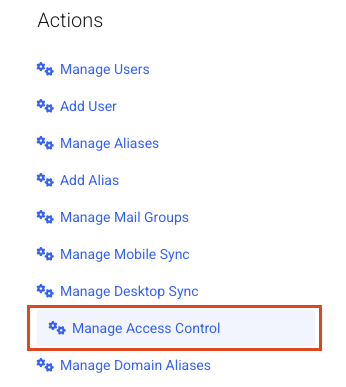
Step 1: Open Manage Access Control
Click Manage Access Control.
Step 2: Add a country
Choose the country from the Country drop-down menu and click Add Country.
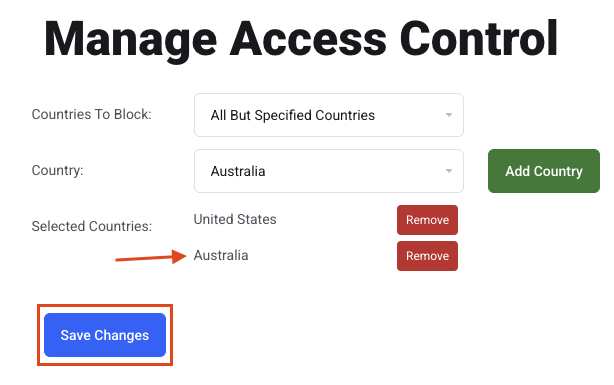
Step 3: Save
Click Save Changes. You are all set.
Step 4: Remove access later
To remove access, click the red Remove button next to the country.
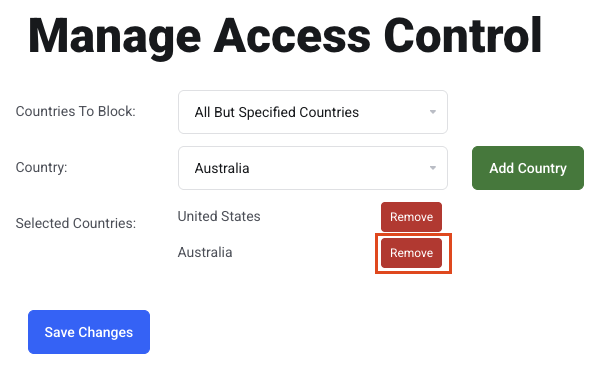
Step 5: Save again
Click Save Changes.