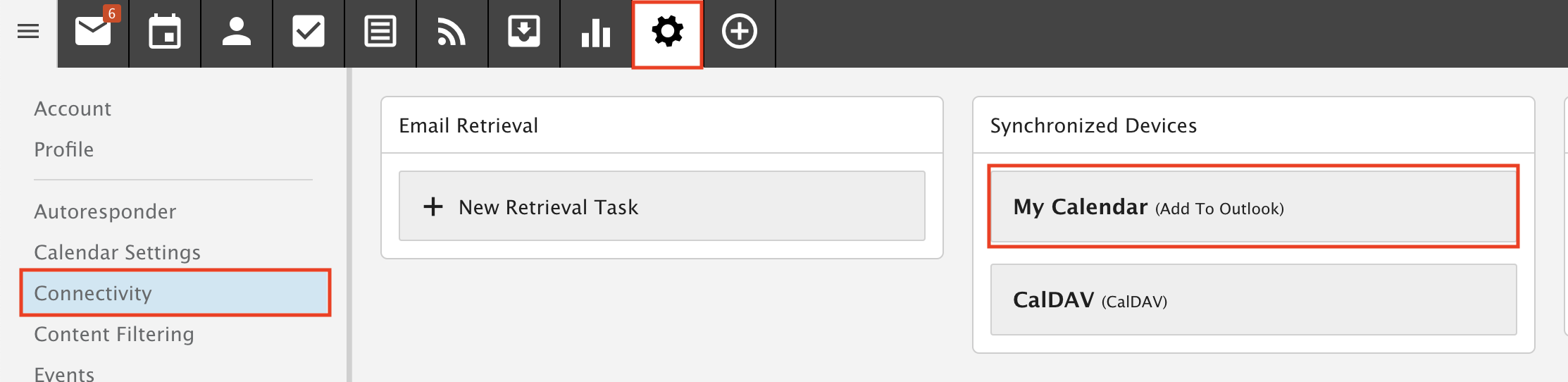
Remove "Add to Outlook"
Remove the old "Add to Outlook" feature so our servers run fast. Please do this as soon as you can.
Please do this as soon as you can. The old Add to Outlook feature no longer works and keeps creating duplicates without stopping. This makes our servers run at 100% CPU and can slow down or crash email for everyone.
If you use Microsoft Outlook with our service, check whether you are using Add to Outlook and remove it. It takes about two minutes.
Instead, we offer Outlook Sync. It keeps your Webmail email, calendar, contacts and tasks in sync with Outlook 2019 or Microsoft 365 and Outlook 2016.
The steps may look a little different depending on your version of Outlook, but they are similar in all of them.
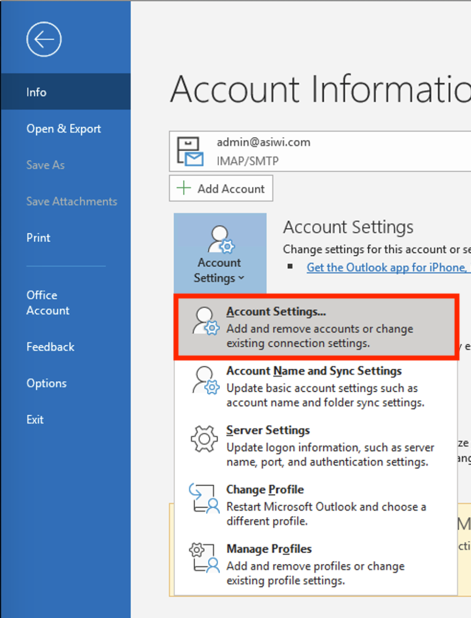
Step 1: Open your account settings in Outlook
Go to File, then Info, then Accounts, then Account Settings.
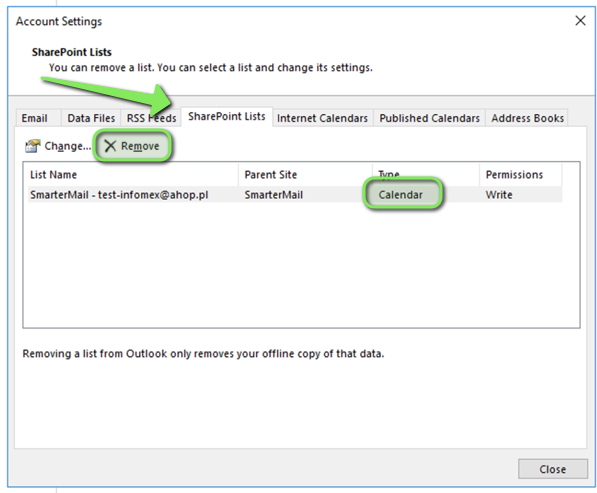
Step 2: Remove your SharePoint Lists
In the Account Settings window, go to Sharepoint Lists. Find your calendars, contacts and tasks and remove them.
Step 3: Delete Add to Outlook in webmail
Log in to Webmail and go to Settings, then Connectivity. Open each Add to Outlook entry you see there and delete it.